-p6UL3AcG.jpg?q=100&w=56&s=305dfae235c95b3ad2b6230b102b7eb4)
-p6UL3AcG.jpg?q=100&w=70&s=e1e40ff373cde0719d253e4c908ba38b)

Product listings with video convert at dramatically higher rates than static images—yet over 60% of small and mid-sized e-commerce brands still publish without a single video asset. The barrier has traditionally been production friction: booking studio space, hiring videographers, and managing tedious post-production workflows for dozens of SKUs.
While enterprise competitors leverage dedicated creative teams to dominate social feeds, recent advancements in AI creative suites have flattened the learning curve. Today, catalog-scale video production can be handled directly from your browser without specialized hardware or a large budget.
Key Capabilities of Modern AI Video Suites
Platforms built for marketing workflows allow sellers to generate photorealistic clips, automated voiceovers, and customized animations from static product assets.
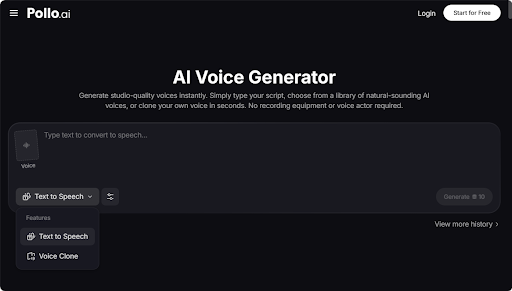
- Contextual AI Voiceover: Tools like Pollo AI and ElevenLabs allow marketers to convert written product descriptions into studio-quality audio. Featuring over a hundred voice profiles filterable by accent and delivery style, these engines adjust speed, pitch, and emotional cadence to eliminate robotic tones.
- Character & B2B Animation: For enterprise or explainer-heavy products, platforms like Vyond offer character-driven animation and customizable vector visuals, making complex product features engaging without requiring camera crews.
- Image-to-Video Motion: Generative engines like Runway and Pika transform standard product photography into atmospheric, ambient video clips suited for social channels and hero banners.
Step-by-Step: Catalog-Scale AI Video Workflow
[Define Format & Intent] ➔ [Generate Visual Anchor] ➔ [Craft Script & Audio] ➔ [Sync & Layer Elements] ➔ [Multi-Format Export]
Step 1: Define Video Format by Destination
Before generating assets, map out platform specifications and conversion goals:
-
Short-Form Social (TikTok, Reels, Shorts): 9:16 aspect ratio, 15–30 seconds, high energy, fast hooks within the first 3 seconds.
-
Amazon / On-Page Listings: 16:9 or 1:1 aspect ratio, 30–60 seconds, feature-focused narrative, warm/authoritative voiceover.
Step 2: Generate the Visual Foundation
Upload high-resolution, static product photos into an image-to-video generator (such as Pollo AI, Pika, or Runway).
-
Tip: For lifestyle products (home décor, fashion), prompt the generator to add subtle environmental motion—such as sunlight shifting across a surface or steam rising from a mug—rather than heavy camera movement, which can distort product geometry.
Step 3: Scripting and AI Voiceover Synthesis
Draft a brief, benefit-first script focusing on sensory details and practical problem-solving.
Sample 15-Second Hook Prompt: "Write a 3-sentence voiceover script for a silk pillowcase. Focus on skin hydration and cooling temperature. End with a strong call to action."
Run the script through an AI Voice generator. Select a profile matching your brand identity—a confident tone for tech accessories, or an unhurried, luxury delivery for high-end skincare.
Step 4: Audio-Visual Sync & Sound Design
Import generated audio into your video editor or use integrated timeline tools (such as Pollo AI or CapCut) to auto-sync narration with visual cues. Add ambient sound design or royalty-free background audio at -18dB to ensure voice clarity remains uncompromised.
Step 5: Export & Multi-Channel Deployment
Export master renders in native resolutions. Establishing a template-driven export pipeline allows a single product video to be formatted simultaneously for Amazon listings, Meta ad placements, and Pinterest product cards.
Advanced Workflow: Scaling with Prompt Libraries
To execute catalog-wide updates efficiently:
-
Build Category Templates: Save standardized prompts for lifestyle, feature explainers, and seasonal sales.
-
Batch Production: Generate visual backgrounds for 10–20 products simultaneously, write scripts in parallel, and batch-render audio assets.
-
Audit Output Quality: Always inspect AI video renders for anatomical or logo distortions prior to deployment.
FAQs
Do product listing videos really increase e-commerce sales?
Yes. According to e-commerce benchmark studies, product listings with video can increase conversion rates by up to 80% compared to listings relying solely on static images. Videos build buyer confidence, clarify product size/scale, and reduce return rates by giving customers an accurate view of what they are purchasing.
Do I need high-resolution product photos to generate AI videos?
Yes. AI image-to-video generators rely on your initial photograph as an anchor. Using high-resolution, well-lit photos with clear product boundaries (preferably on clean backgrounds or professionally styled settings) yields far cleaner AI motion renders without visual distortion or blurred branding.
Can I use AI-generated product videos directly on Amazon and Shopify?
Absolutely. Most modern e-commerce platforms support standard MP4 or MOV file formats. Just ensure your exported video meets the platform's specific aspect ratio requirements (e.g., 16:9 or 1:1 for Amazon listings, 9:16 for vertical TikTok/Shopify Shoppable Video apps) and visual guidelines.

